Dropzone settings
Every setting under Settings → Dropzone Settings: address and timezone, manifest and credit rules, ticket prices, weather alerts, and sales tax, with defaults and what each one does.
These are the dropzone-wide defaults for manifesting, credits, weather alerts, and tax. Your EZDZ team usually fills in the basics (address and timezone) when we set up your dropzone. It's worth a quick review on day one.
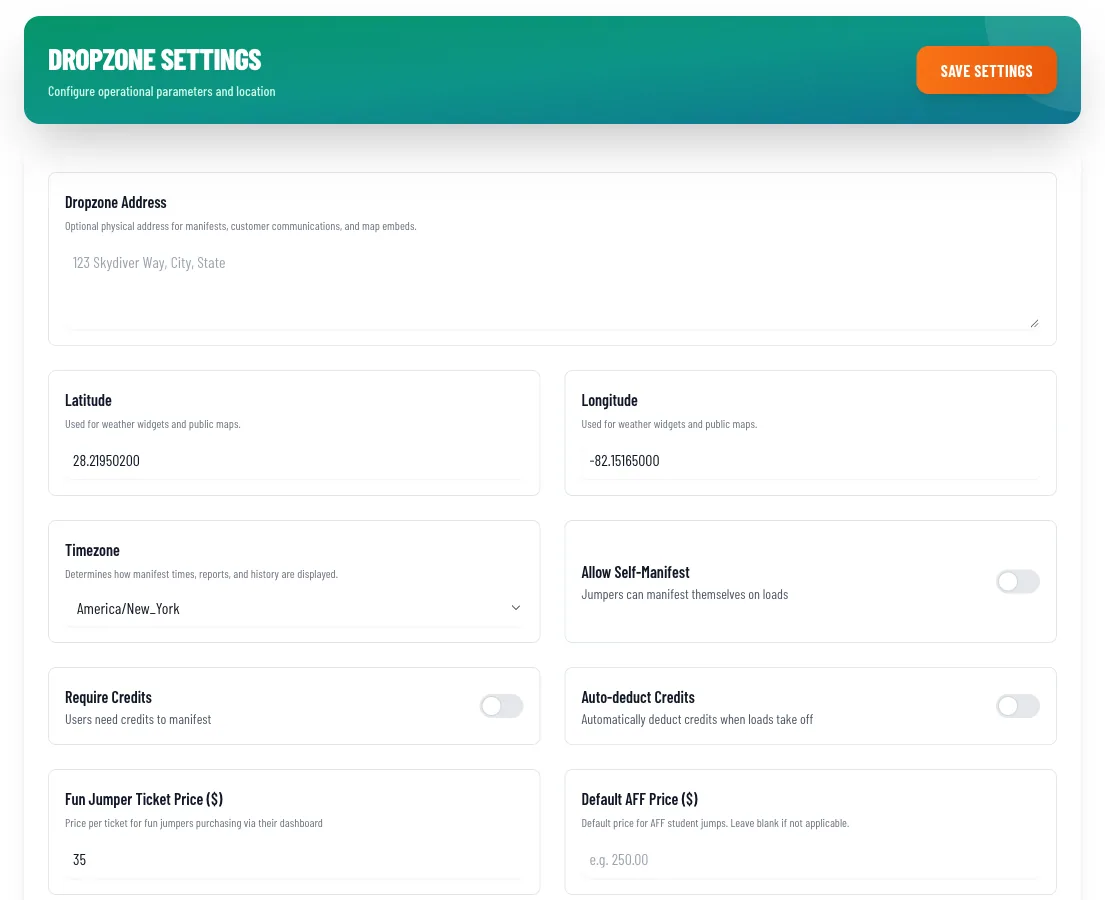
Location and timezone
Timezone
Admin only- Where:
- Dropzone Settings
- Default:
- America/New_York
Controls how manifest times, reports, history, booking slots, and reminder emails are shown. If dates or times look "off" on your booking page, check this first. Pick your dropzone's local timezone from the list.
Dropzone Address
Admin only- Where:
- Dropzone Settings
- Default:
- Empty
Optional physical address used on manifests, customer communications, and map embeds.
Latitude and Longitude
Admin only- Where:
- Dropzone Settings
- Default:
- Empty
Used for weather widgets and public maps, and by the weather alert emails below. Use six decimal places, for example 34.267850 and -81.589320.
Manifest and credits
Allow Self-Manifest
Admin only- Where:
- Dropzone Settings
- Default:
- On
When on, fun jumpers can manifest themselves from their own dashboard. Encourage this on busy days because it cuts a lot of work at the manifest desk. Turn it off if you want staff to control every slot.
Require Credits
Admin only- Where:
- Dropzone Settings
- Default:
- Off
When on, a jumper needs credits (tickets) to be manifested. This is the easiest way to run a fun jumper operation: they buy tickets, manifest, and the credit is finalized at takeoff, so you never chase payment afterward. If you would rather let people fly now and settle up later, use Reconciliation Mode instead (see below).
Auto-deduct Credits
Admin only- Where:
- Dropzone Settings
- Default:
- On
The app describes this as automatically deducting credits when loads take off. Leave it On. Credits are set aside when a jumper is manifested and finalized when you mark the load In The Air.
Fun Jumper Ticket Price
Admin only- Where:
- Dropzone Settings
- Default:
- 0
The price per ticket (one credit is one jump slot) when jumpers buy tickets from their dashboard.
Default AFF Price
Admin only- Where:
- Dropzone Settings
- Default:
- Blank
Default price for AFF student jumps. Leave blank if you don't run AFF.
See Staff & jumpers for the four ways to run credits (including packages and Reconciliation Mode) and how to sell and adjust them.
Weather alert thresholds
There's no official tandem wind standard, so these are conservative starting points you can adjust for your site. When the forecast crosses either threshold for an upcoming operating day, staff get an informational email. Nothing is cancelled automatically. This needs your latitude and longitude.
Gust Spread (knots)
Admin only- Where:
- Dropzone Settings → Weather Alert Thresholds
- Default:
- 10
The difference between gusts and sustained wind that triggers an alert.
Sustained Wind (knots)
Admin only- Where:
- Dropzone Settings → Weather Alert Thresholds
- Default:
- 18
The sustained wind speed that triggers an alert.
Sales tax
Turn tax on if you collect sales tax on bookings and products. You also mark individual packages and add-ons as Taxable in Booking system → Pricing & Packages.
Enable Tax Collection
Admin only- Where:
- Dropzone Settings → Tax Settings
- Default:
- Off
Adds sales tax to taxable products at checkout. Turning it on reveals the fields below.
Tax Rate (%)
Admin only- Where:
- Dropzone Settings → Tax Settings
- Default:
- None
For example, enter 8.25 for 8.25%.
Tax Label
Admin only- Where:
- Dropzone Settings → Tax Settings
- Default:
- Sales Tax
The name customers see at checkout.
Apply Tax After Discounts
Admin only- Where:
- Dropzone Settings → Tax Settings
- Default:
- Off
When on, coupons reduce the taxable amount before tax is calculated.